Getting Started with A Thousand Cloys
From Living Resources welcome mail to your first strong session on Kalahari.
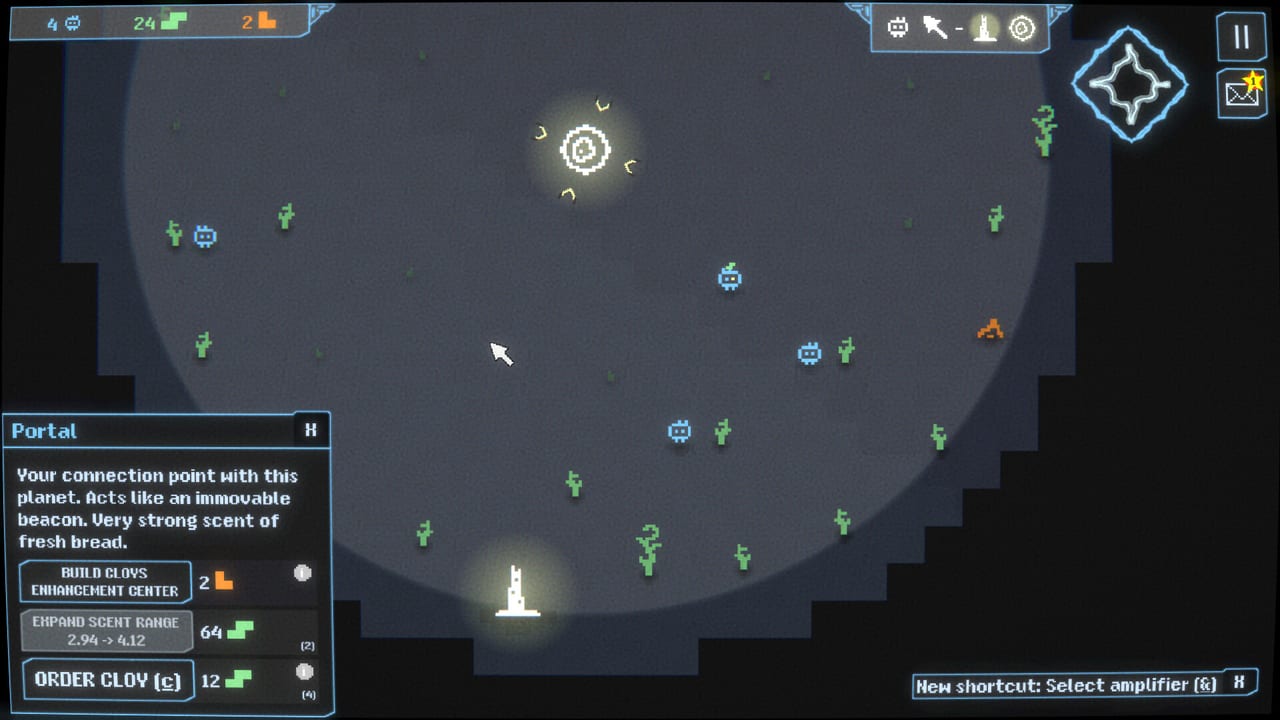
Welcome to Cloys Inc.
A Thousand Cloys is a chill exploration incremental from studio 3-50 (Grhyll). You cleanse alien planet Kalahari of Klein radiation by harvesting resources, importing high-tech toaster robots called Cloys, expanding beacon coverage, and uncovering a talent tree that literally sits in the world. Full release launched on Steam on November 23, 2026 for $7.99 (launch intro around $7.19), Steam App ID 3861740. Expect roughly 15–25 hours, single-player on Windows, with English and French interface support. Keyboard and mouse are the intended controls — see Controls and System Requirements when you need bindings or PC specs.
This page is the day-one path. After you finish it, continue with How to Play for active-versus-idle pacing, then specialize into Cloys & Resources, the Exploration Guide, the Upgrade Tree, and Prestige & Sessions.
Buy the game or try the demo first
You have two friendly on-ramps:
- Full game on Steam — buy when you are ready for the complete campaign and prestige loop.
- Free demo — available on Steam and itch. The demo covers roughly the first 1–2 hours. Elements past a progression threshold stay locked, but the demo save carries into the full game, so practice time is not wasted.
If you came from the itch browser build or an older demo patch, still treat tooltips as truth: Grhyll’s post-demo feedback repeatedly showed players missing unlocks that were already explained on screen. Launch context and patch notes live under Updates and Launch Day.
Open the portal and read the corporate mail
The fiction frames you as a new hire at Cloys Inc., the universe’s leading toaster company. Living Resources (the in-world mail voice) assigns you a processed planet to cleanse. A connection zone is calculated and a portal opens onto Kalahari. Your job is not a combat campaign — it is efficient radiation cleanup through automation, exploration, and smart session endings.
First minutes checklist:
- Confirm the portal / outpost hub is your home base for ordering Cloys and cashing sessions later.
- Hover every new button. Tooltips explain scent range, heat power, carry rules, and structure costs before you spend.
- Note that resources, upgrade nodes, and structures physically exist on the map. Nothing important is only a spreadsheet tab.
Order your first Cloys
Cloys are toaster-shaped workers that still toast bread and send messages in lore, but on Kalahari they mine and haul under hazardous radiation. You import / order them with early resources rather than crafting a huge army by hand. Early on, a small swarm that can actually reach nodes beats a large swarm stuck outside beacon scent range.
Practical first-hour habits:
- Order Cloys when you can afford them without starving beacon or structure builds.
- Point them at nearby harvestables; let automation do the walking while you click for burst value when the game rewards it.
- Watch heat power and speed — weak Cloys on hard nodes waste a session. Details belong in Cloys & Resources.
Expand beacon scent range before you spam workers
Fog of Klein radiation hides most of the planet. Beacons (including the Alpha beacon relay tied to your portal) push that fog back by attracting Cloys with a fresh-bread scent fantasy. Expanding range / scent early is usually better than stacking more Cloys into a tiny cleared circle.
Why range first matters:
- More map = more resource types, Climb regenerating nodes, and upgrade-tree discoveries.
- Structures such as amplifiers and the Enhancement Centre need reachable build sites.
- Session payout quality scales with how much you efficiently cleared, not only how many units you bought.
When fog opens onto acid lakes, mountains, mysterious doors, monoliths, or pulsating fields, pause and study them. The Exploration Guide covers Alpha beacon moves, anomaly habits, and map reading in depth.
Early resources and what to spend them on
Your early loop is simple on purpose: harvest → import Cloys → expand beacons → build key structures → explore → end session for payout → upgrade permanent outposts → restart stronger. Numbers stay readable; the pace is steady rather than exponential spam.
Spend priority for the first strong hour:
- Beacon coverage so the swarm can work new tiles.
- Enhancement Centre access so heat power, speed, and related Cloy stats climb.
- Amplifier and other support builds once you have a foothold.
- Upgrade-tree nodes you physically uncover — bank session money for them instead of impulse-buying every worker.
Regenerating Climb crystals / bushes are excellent mid-loop targets once revealed; they reward return visits without forcing you to abandon exploration. Avoid inventing secret file codes or patch dates beyond what Updates lists — stick to systems you can see.
Active clicks, idle gains, and when to walk away
The game is essentially active, but leaving it idle still accumulates resources. Use short active bursts to place beacons, retarget Cloys, and claim structures, then let the swarm work while you grab a drink. That hybrid rhythm is the heart of How to Play.
Do not fear ending a session. When the payout looks healthy, cash out, invest in permanent outposts, and restart with a stronger baseline. That prestige-style loop is explained in Prestige & Sessions — treat it as progress, not a soft fail.
Controls, comfort, and community links
Bind movement, camera, and focus shortcuts until targeting Cloys feels automatic (Controls). Confirm your PC matches System Requirements. If you record videos, remember the press kit note about false YouTube copyright strikes on music arrangements — dropping music volume to zero for uploads avoids headaches.
For official chatter, use the community links on Links (Discord discord.gg/tK9GssNR6A, Bluesky grhyll.bsky.social, X @Grhyll). This wiki is unofficial; prices and policies always defer to Steam and 3-50.
Suggested next reads
- How to Play — win conditions as efficiency, corporate framing, idle vs active.
- Cloys & Resources — ordering, heat power, Enhancement Centre, Climb nodes.
- Exploration Guide — fog, beacons, anomalies, world upgrade nodes.
- Upgrade Tree — discovering and funding talent nodes.
- Prestige & Sessions — payout timing and permanent outposts.
Return to the Guides Hub whenever you need the full map of walkthroughs. Keep tooltips on, expand range before greed, and let the toasters cook.
Frequently Asked Questions
Quick answers to the most common questions.
Should I buy A Thousand Cloys or start with the demo?
Either works. The free demo covers about 1–2 hours and its save carries into the full Steam game (App ID 3861740). Buy the full release when you want the complete prestige and exploration loop.
What should I unlock first after the portal opens?
Order a small Cloy swarm, expand beacon scent range so they can reach new tiles, then push toward the Enhancement Centre and early structures. Read every tooltip before spending.
Is A Thousand Cloys multiplayer or free-to-play with codes?
No. It is a paid single-player Steam title for Windows. There are no redeem codes—focus on sessions, Cloys, and exploration instead.
Where do I learn controls and PC specs?
Use the Controls and System Requirements pages under Tools. Keyboard and mouse are the intended input; estimated playtime is about 15–25 hours.
When should I end my first session?
End when the payout feels meaningful and you have clear permanent outpost upgrades to buy. Restarting stronger is the intended loop—see Prestige & Sessions for timing tips.