A Thousand Cloys Demo to Full Game Transfer
Carry your Steam or itch demo progress into the November 23, 2026 full release.
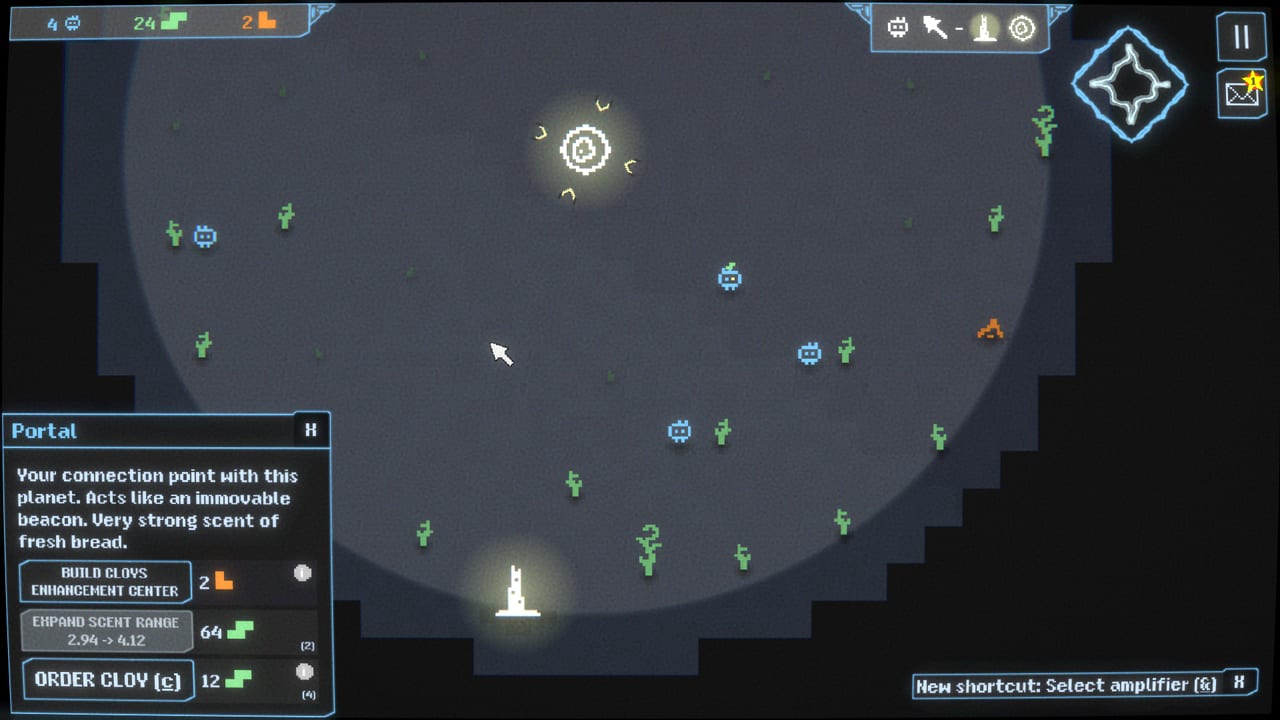
A Thousand Cloys launched on Steam on November 23, 2026 as a Windows single-player exploration incremental from studio 3-50 (Grhyll). Many players already spent hours in the free demo before buying. This page explains how demo progress moves into the full game, how itch and Steam differ, what the paid release adds beyond the early slice, and the checklist you should run after purchase.
For price, storefront links, and the wider launch snapshot, start with Launch Day. For first-hour systems after you are in the full build, continue with Getting Started.
Demo versus full at a glance
| Item | Demo | Full game |
|---|---|---|
| Steam app | 4140860 | 3861740 |
| Typical length | About 1–2 hours of early content | About 15–25 hours per developer OUT NOW notes |
| Price | Free | $7.99 standard; launch intro about $7.19 ending ~November 30 |
| Languages | English, French UI | English, French UI |
| Players | Single-player | Single-player |
| Save carryover | Designed to transfer into the full Steam game | Receives supported demo progress |
The demo is the beginning of the corporate assignment on planet Kalahari, not a separate sandbox. Mechanics you learn—ordering Cloys, expanding beacon scent range, clearing Klein radiation fog, ending sessions for payouts—stay the same language in the full release. What changes is how far the planet, upgrade tree, and prestige loop continue past the demo threshold.
How Steam demo saves carry into the full game
Progress from the supported Steam demo path is meant to carry into the full game. When you own app 3861740, launch the paid build and follow any in-client prompts that migrate cloud or local slots from demo app 4140860. Do not delete the demo depot until you have confirmed the save appears in the full client if disk space is tight.
Practical Steam path:
- Play or pause the Steam demo on the same Windows account you will use for purchase.
- Buy the full game while any intro pricing is still live if you care about the launch discount.
- Install app 3861740, then boot it once before uninstalling the demo.
- Confirm resources, beacon state, Cloys counts, and session progress match what you left in the demo.
- Open Options and recheck binds, Camera Comfort, and Custom Volume Controls—see Controls.
If something looks missing, fully quit both apps, relaunch the full game, and give Steam Cloud a moment to settle before assuming a wipe. This wiki is unofficial; if migration fails, check Steam discussions and studio channels listed on the Links Hub.
Itch demo export is one-way toward Steam
The itch HTML5 / browser demo can export a save toward Steam, but not the reverse. That means:
- You can start on itch, export, then continue on Steam after buying the full game.
- You cannot take a Steam save and push it back into the itch demo.
- Prefer finishing the handoff on Steam before you rely on the browser build again.
If you bounced between platforms during the demo year, treat Steam as the durable home once you purchase. Export from itch first, verify the Steam slot, then keep playing on the paid app. Mixing platforms after purchase without verifying the active slot is the easiest way to “lose” progress that is actually sitting in another save location.
What the full game adds past the demo threshold
Demo players typically see onboarding: Living Resources mail, the portal onto Kalahari, early Cloys orders, the first beacons, opening fog, and a taste of session payouts. Elements past a progression threshold stay locked in the demo so the free slice remains an honest preview rather than the whole campaign.
The full release extends that loop across a much longer arc. Developer OUT NOW notes point at roughly 15–25 hours of content—far beyond the demo’s 1–2 hour window. Expect more of Kalahari’s mountains, acid lakes, doors, monoliths, and anomalies; a deeper set of upgrade-tree nodes that still live in the world; longer prestige-style sessions with permanent outpost growth; and the complete single-player campaign framed by Cloys Inc.’s toaster satire.
You are not changing genres when you upgrade.
The paid build is also where the 20 Steam achievements start to matter past the tutorial pops. Achievements lists the official lines, and Kalahari Landmarks explains doors, wind, resin, and remote bases the demo only hints at. Session habits that still work after the transfer are on Build Order. You are unlocking the rest of the corporate environmental contract with the same readable numbers, chill pacing, and beacon-driven exploration that made the demo feel distinct from pure idle clickers.
Purchase steps and intro pricing
- Confirm your PC against System Requirements (Windows 10+, modest CPU/GPU, small install).
- Open the Steam store page for app 3861740 and verify live regional pricing. Standard sticker is $7.99; launch listings showed an introductory cut to about $7.19 ending around November 30.
- Complete purchase, install, and launch once while online so licenses and cloud sync initialize.
- If you used the itch demo, run the export-to-Steam flow before you overwrite anything.
- Verify the migrated save, then optionally remove the demo depot.
Bundles and regional currencies can change the cart total. Use Steam’s live widget as truth; this page only records the commonly cited USD launch figures.
Verify the save, then recheck Options
After the first full-game boot:
- Confirm the portal hub, Cloys swarm, beacon coverage, and currency match your demo state.
- End a short session or open a known menu to prove the slot is writable.
- Recheck mouse binds, Alpha beacon right-click movement, Camera Comfort, and volume sliders under Options (Controls).
- If you record or stream, set music volume to 0 before capturing—see the soundtrack caution on Launch Day and related creator notes elsewhere on the wiki.
Only after those checks should you uninstall the demo or clear old itch browser data.
Where to go next on the wiki
- Launch Day — price, storefronts, and launch-week context.
- Getting Started — first portal habits once the full map is open.
- Controls — binds and comfort options after migration.
- System Requirements — PC floor before you blame a soft save.
- Links Hub — Steam, itch, press kit, and community channels.
Upgrade when you want the rest of Kalahari. Keep the demo until the full-game save is visibly healthy, treat itch export as one-way, and let the toasters keep working under the same corporate contract—just with a much longer assignment ahead.
Frequently Asked Questions
Quick answers to the most common questions.
Does the A Thousand Cloys demo save transfer to the full game?
Yes on the supported path. Steam demo app 4140860 progress is designed to carry into full game app 3861740. Confirm the save in the paid client before deleting the demo.
Can I move a Steam save back to the itch demo?
No. The itch demo can export toward Steam, but Steam saves cannot move back into the itch demo. Treat Steam as the durable home after purchase.
How long is the demo compared with the full game?
The demo covers roughly the first 1–2 hours. Developer OUT NOW notes put the full single-player arc around 15–25 hours.
What should I do right after buying?
Install app 3861740, verify the migrated save, then recheck Options binds and volumes. See Controls and System Requirements if anything feels off.
Is the launch intro discount permanent?
No. The standard price is $7.99. Launch listings showed about $7.19 intro pricing ending around November 30—always confirm the live Steam price.